
Query hints is a new feature introduced in SQL Server 2022, please go over the following simulation to understand this great feature.
// create the following dummy database with the below t-sql code:
CREATE DATABASE RethinkRecompileDemo;
ALTER DATABASE RethinkRecompileDemo SET RECOVERY SIMPLE;
GO
USE RethinkRecompileDemo;
GO
CREATE TABLE dbo.SalesOrders
(
SalesOrderId INT IDENTITY(1, 1) NOT NULL,
OrderDate DATETIME NOT NULL,
CustomerId INT NOT NULL,
SalesPersonId INT NOT NULL,
TotalAmount DECIMAL(10, 2) NOT NULL,
OrderStatus VARCHAR(50) NOT NULL,
CreateDate DATETIME NOT NULL
DEFAULT GETDATE(),
CONSTRAINT PK_SalesOrders_Id
PRIMARY KEY CLUSTERED (SalesOrderId)
);
GO
;WITH cteN (Number)
AS (SELECT TOP 3000000
ROW_NUMBER() OVER (ORDER BY (SELECT NULL))
FROM sys.all_columns AS s1
CROSS JOIN sys.all_columns AS s2
)
INSERT INTO dbo.SalesOrders
(
OrderDate,
CustomerId,
SalesPersonId,
TotalAmount,
OrderStatus
)
SELECT DATEADD(DAY, RAND(CHECKSUM(NEWID())) * (1 + 1095), ‘2020-01-01’) AS OrderDate,
ABS(CHECKSUM(NEWID()) % 5000) + 1 AS CustomerId,
CASE
WHEN RAND(CHECKSUM(NEWID())) < 0.75 THEN
ABS(CHECKSUM(NEWID()) % 50) + 1
ELSE
ABS(CHECKSUM(NEWID()) % 450) + 51
END AS SalesPersonId,
ABS(CHECKSUM(NEWID()) % 500) + 150 AS TotalAmount,
CASE
WHEN RAND(CHECKSUM(NEWID())) < 0.10 THEN
‘New’
WHEN RAND(CHECKSUM(NEWID())) < 0.20 THEN
‘In process’
ELSE
‘Shipped’
END AS OrderStatus
FROM cteN n;
GO
CREATE NONCLUSTERED INDEX [IX_OrderDate+SalesPersonId+TotalAmount]
ON [dbo].[SalesOrders] ([OrderDate])
INCLUDE
(
[SalesPersonId],
[TotalAmount]
);
GO
CHECKPOINT;
GO
// I have altered the query store setting to capture it quickly….every 1 minute
USE [master]
GO
ALTER DATABASE [RethinkRecompileDemo] SET QUERY_STORE (OPERATION_MODE = READ_WRITE, DATA_FLUSH_INTERVAL_SECONDS = 60, INTERVAL_LENGTH_MINUTES = 1, QUERY_CAPTURE_MODE = ALL)
GO
// create a procedure under the database:
use [RethinkRecompileDemo]
GO
CREATE OR ALTER PROCEDURE dbo.proc1
@OrderStatus varchar(50)
AS
SELECT *
FROM dbo.SalesOrders
WHERE OrderStatus=@OrderStatus
GO
// execute the procedure multiple times with different values as shown below
use [RethinkRecompileDemo]
GO
EXECUTE dbo.proc1
@OrderStatus=”Shipped”
GO
EXECUTE dbo.proc1
@OrderStatus=”New”
GO
EXECUTE dbo.proc1
@OrderStatus=”In process”
GO
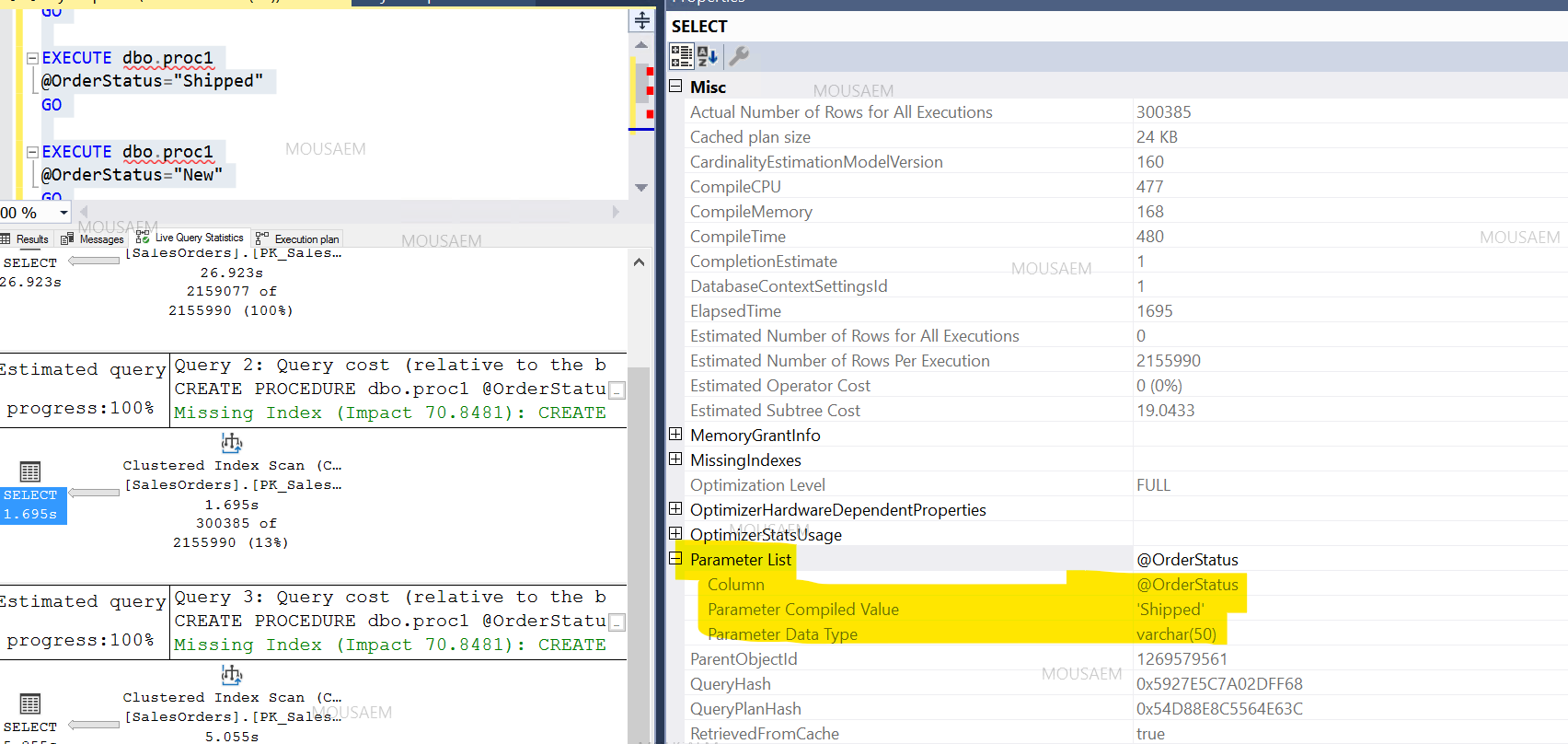
// enable the execution plan generation in SQL Server Management Studio, a parameter list is being displayed and as expected its using the same @OrderStatus value passed “Shipped” even with different queries
// I will explore now the query hint feature:
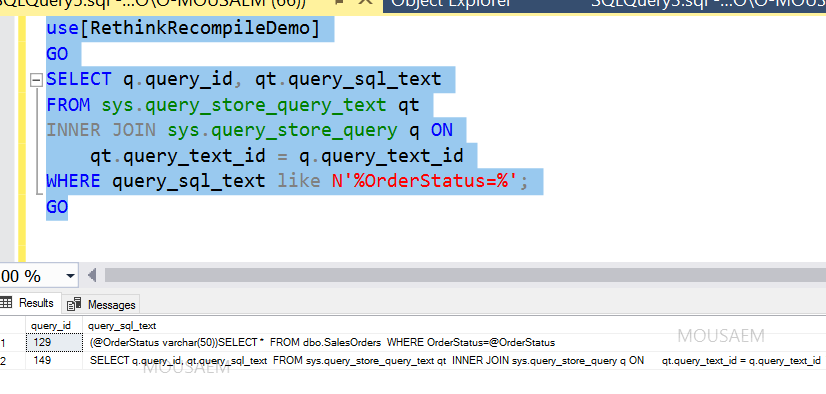
To find the query id:
use[RethinkRecompileDemo]
GO
SELECT q.query_id, qt.query_sql_text
FROM sys.query_store_query_text qt
INNER JOIN sys.query_store_query q ON
qt.query_text_id = q.query_text_id
WHERE query_sql_text like N’%OrderStatus=%’;
GO
// Will enable the RECOMPILE hint option on the query through the query store:
use[RethinkRecompileDemo]
GO
EXEC sys.sp_query_store_set_hints @query_id= 129, @query_hints = N’OPTION(RECOMPILE)’
Query for verification that the hint is in effect:
use[RethinkRecompileDemo]
GO
SELECT query_hint_id, query_id, query_hint_text, last_query_hint_failure_reason, last_query_hint_failure_reason_desc, query_hint_failure_count, source, source_desc
FROM sys.query_store_query_hints
WHERE query_id = 129;
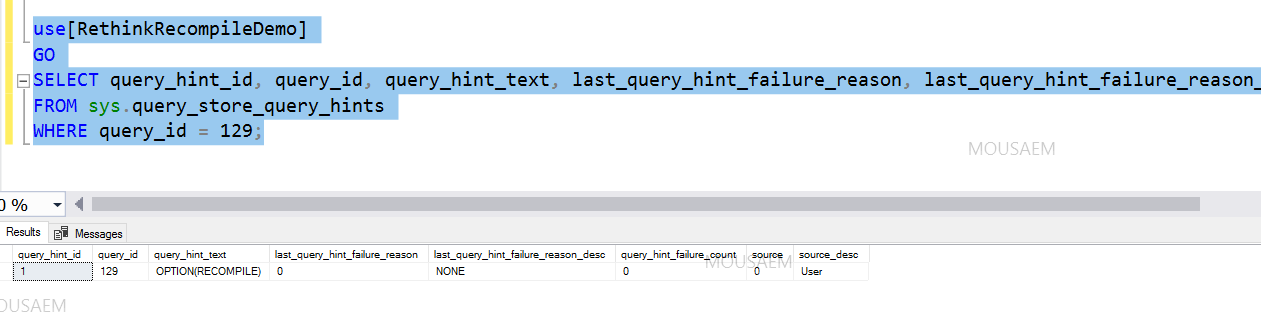
Re-execute the three procedures again and as shown below of the execution plan, the hint is applied successfully to overcome “parameter sniffing” problem and “Parameter List” is not being displayed in the properties windows on the right side:

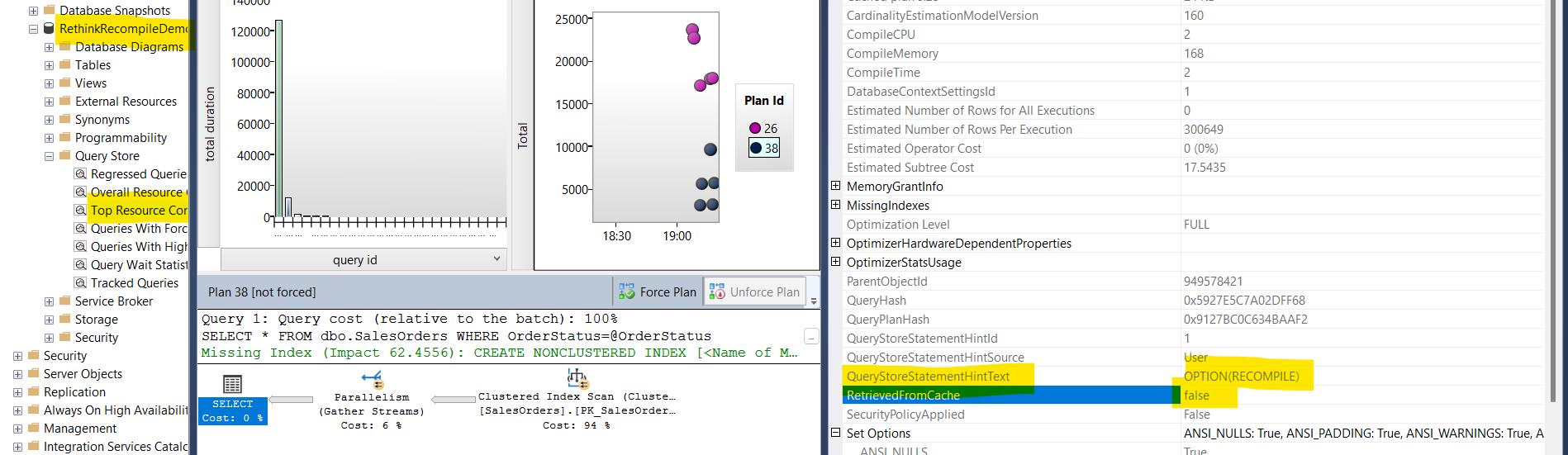
In the database query store…view “Top Resource Consuming Queries” and view the executed query properties:
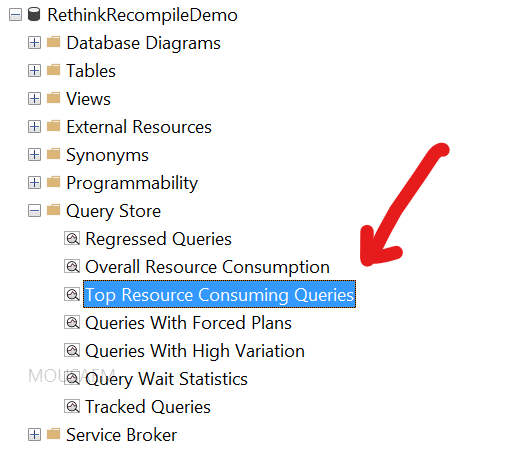
Query hint option is displayed:
Important Remark: if you flush your query store data (deleting query store data)….all your hints enabled will be consequently removed, its a good idea to keep this information backed-up if you need to reapply it again , or of course restore old copy of the database.
 sql server warrior